# Download All Variations

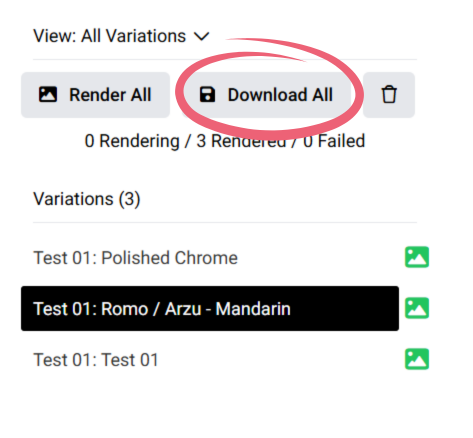
In order to download all renders, you can press the Download All option here:

<figure><img src="https://1229207575-files.gitbook.io/~/files/v0/b/gitbook-x-prod.appspot.com/o/spaces%2Fv3R7xjvJcsIFNxg1zMmq%2Fuploads%2FuCWj8sg6Q15aEkWYp6ZV%2Fdownload%20all.png?alt=media&#x26;token=e17d2a1b-219b-449e-adcf-8204f5e3b540" alt="" width="355"><figcaption></figcaption></figure>

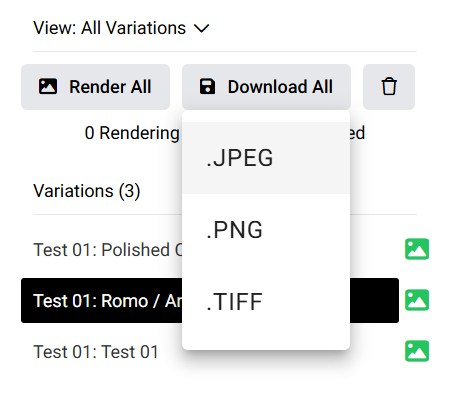
then select the right file format:

<figure><img src="https://1229207575-files.gitbook.io/~/files/v0/b/gitbook-x-prod.appspot.com/o/spaces%2Fv3R7xjvJcsIFNxg1zMmq%2Fuploads%2F6QO1izAScKOCholxMU8S%2Fimage.png?alt=media&#x26;token=224e9462-99a7-4a55-8dee-4fec6ce144a9" alt="" width="347"><figcaption></figcaption></figure>

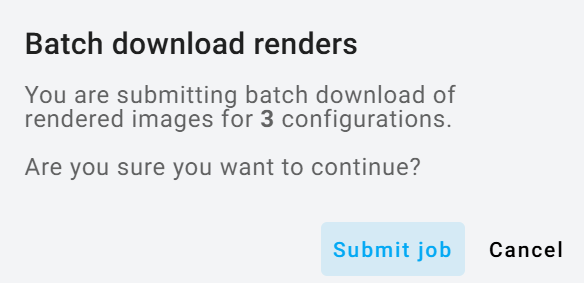
and press submit:

<figure><img src="https://1229207575-files.gitbook.io/~/files/v0/b/gitbook-x-prod.appspot.com/o/spaces%2Fv3R7xjvJcsIFNxg1zMmq%2Fuploads%2FEbmpFzyH3v9RqpAwW9HU%2Fimage.png?alt=media&#x26;token=c36cf8db-3174-43e0-b52c-f7e1d8f1e50c" alt="" width="438"><figcaption></figcaption></figure>

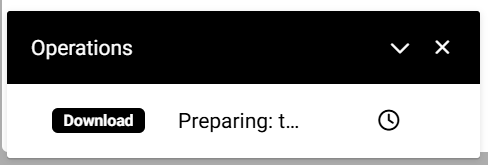
After submitting, a progress window will appear in the bottom-left corner while the images are zipped. When finished, a dialog will open allowing you to save the file.
<figure><img src="https://1229207575-files.gitbook.io/~/files/v0/b/gitbook-x-prod.appspot.com/o/spaces%2Fv3R7xjvJcsIFNxg1zMmq%2Fuploads%2F2Ilt0cRSjLnUip9lqoAB%2Fimage.png?alt=media&#x26;token=91e60958-54fe-4a08-8c00-a8ca35caeed4" alt="" width="366"><figcaption></figcaption></figure>