> For the complete documentation index, see [llms.txt](https://docs.colormass.com/llms.txt). Markdown versions of documentation pages are available by appending `.md` to page URLs; this page is available as [Markdown](https://docs.colormass.com/scanning-and-tiling/exports/pbr-exports.md).
# PBR Exports
## Default Export
To access the PBR exports, click the PBR Exports option on the right.
Then, 5 default options will be listed, consisting of combinations of:
* 3 file formats: `.jpg`, `.tiff`, `.exr`
* 2 resolution settings: `low` and `original` (original refers to the resolution of the original scan).
colormass materials are exported as ZIP files. An exemplary export would contain the following data:
Exemplary ZIP file contents of an exported dataset
Tie *info.txt* file contains meta information regarding the material and the export settings:
```
Article ID: 6713402
Width: 127.00 cm
Height: 127.00 cm
Exported for workflow: Metallness / Roughness
Normal map orientation: +Y up
Resolution: Original
```
The other files are image files, named according to the following schema:
* *\[id]*-*\[name]*-diffuse.*\[ext]*
* *\[id]*-*\[name]*-normal.*\[ext]*
* ...
\[id] refers to the internal colormass material ID
\[name] refers to the material name
\[ext] refers to the file extension (JPEG, TIFF, EXR)
## Custom Export
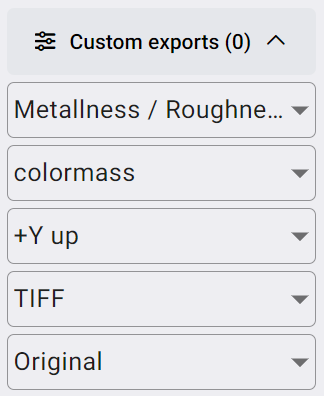
The zip file above in regular circumstances exported using default settings. There is however a possibility to export a material with various settings on the platform. These possibilities include the following options:
* **Workflow**:
* Metallnes / Roughness
* Specular / Glossiness
* **Render Engine**:
* colormass
* Corona
* VRay
* Cycles
* **Normal direction**:
* Engine default
* +Y up
* +Y down
* **File type**:
* .exr
* .tiff
* .png
* .jpg
* **Resolution**:
* Original
* 72 dpi
See screenshot of where these settings can be chosen:
Custom PBR export setting
## Map Types
For the map types prefer refer to [PBR Maps](/scanning-and-tiling/scanning/pbr-maps.md).
## Exported Maps
Assuming that you selected *Engine default* option for the normal map these are the maps that will be exported for various workflows and render engines.
### Metalness / Roughness Workflow
#### colormass
* Maps: diffuse, normal, metalness, roughness, specular, anisotropy, displacement
* Anisotropy: As one map
* Normals: y+down
#### Cycles
* Maps: diffuse, normal, metalness, roughness, specular, anisotropy-strength, anisotropy-rotation, displacement
* Normals: y+up
* Anisotropy: anisotropy-strength: 0 ... 1.0, anisotropy-rotation: Counter-clockwise
#### V-Ray
* Maps: diffuse, normal, metalness, roughness, specular, anisotropy-strength, anisotropy-rotation, displacement
* Normals: y+down
* Anisotropy: anisotropy-strength: 0 ... 1.0, anisotropy-rotation: Clockwise
### Specular / Glossiness Workflow
#### VRay
* Maps: diffuse, reflect, normal, gloss, fresnel-ior, anisotropy-strength, anisotropy-rotation, displacement
* Normals: y+down
* Anisotropy: anisotropy-strength: 0 ... 1.0, anisotropy-rotation: Clockwise
#### Corona
* Maps: diffuse, reflect, normal, gloss, fresnel-ior, anisotropy-strength, anisotropy-rotation, displacement
* Normals: y+down
* Anisotropy: anisotropy-strength: 0.5 ... 1.0 (?), anisotropy-rotation: Clockwise